
BluSeaBook a demo

Product/Planning

The programme of works, calculated and ready to edit

Ask the Assistant for it or import your schedule from Primavera or MS Project. BluSea calculates the critical path and opens it in a complete editor, with every activity linked to its origin.

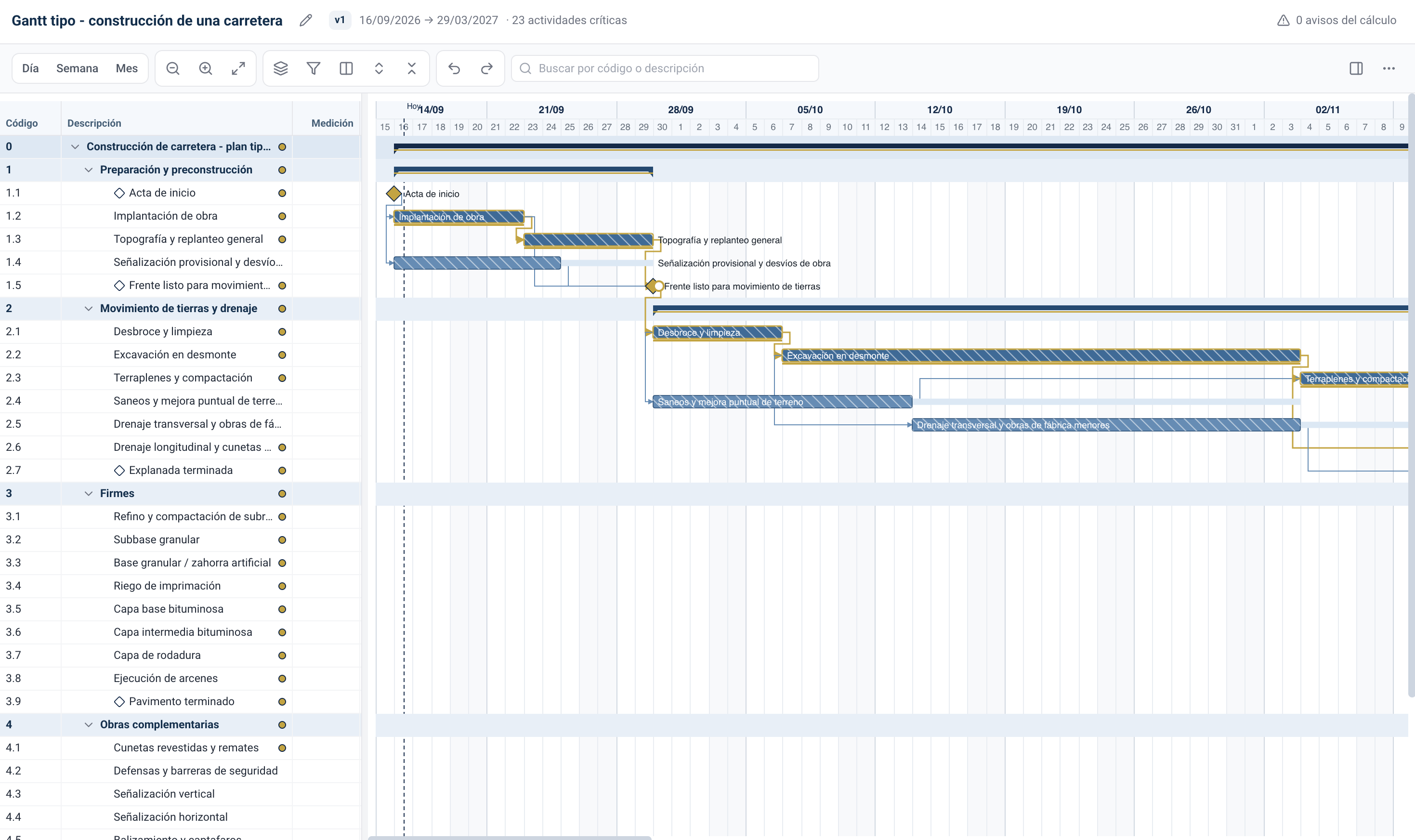
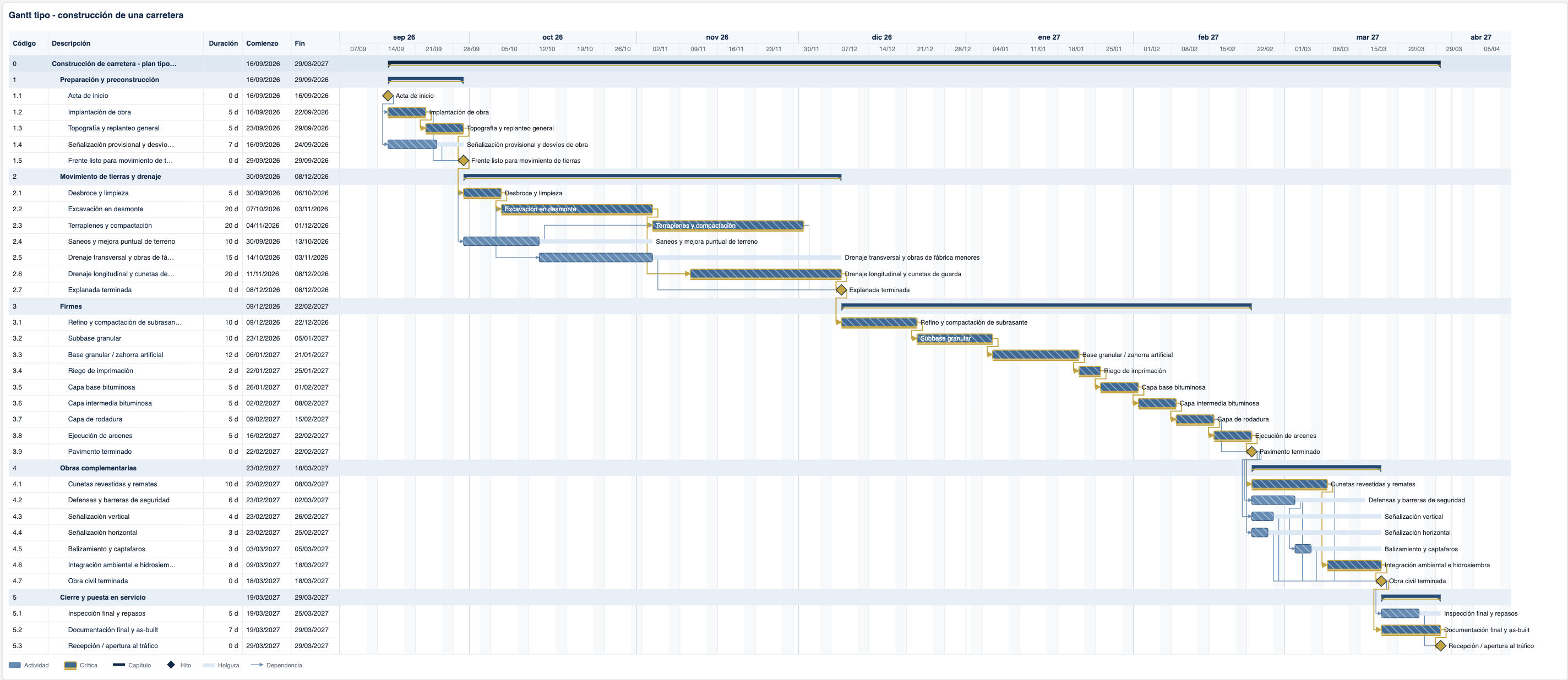
The Planning Editor with the programme of works for a road: chapters, activities, milestones, dependencies and the calculated critical path.

A schedule is not a drawing of bars: it is a network of activities that has to fit the project. BluSea calculates it, edits it with you and justifies every date.

A complete planning editor

Chapters, activities, milestones and dependencies, with daily, weekly or monthly views. Every change is recalculated instantly and the critical path is always visible.

  • Critical path and float

    The calculation moves dates, float and critical activities with every change, and warns you when something doesn't add up.

  • Every activity, inside and out

    Data, calculation, relationships, constraints and provenance for each activity, in a panel beside the Gantt chart.

  • Versions, as in Word

    Open, compare with the current version, restore and label any version. What is saved stays saved.
Ask the Assistant

Choose “Planning” in the Assistant and describe the project or give it the documents. You get a calculated Gantt chart that opens in the Editor, and you can ask questions about it.

  • From document to Gantt chart

    Chapters, activities, durations and dependencies from the design and the tender documents, with the completion time they require.

  • Ask the schedule

    What is the critical path? Which milestones have the least float? The answers come from the calculation, not from an estimate.

  • Citations that open the Editor

    Every activity cited in an answer or a document opens the Editor at that activity and in that version.

Your Primavera and MS Project schedules, inside

Upload a Primavera XER or a Project XML file to the workspace and open it in the Editor, with its calendars, progress and relationships.

  • Faithful import

    Calendars, progress and source attributes, with a tab to see how the file came in.

  • In the technical proposal

    The programme of works diagram goes into the bid's technical proposal as a figure, generated from the schedule.

  • Back to Primavera

    Export the schedule as XER to keep working in P6.

Planning no longer starts with a blank sheet.

15 minfor a programme of works
With chapters, milestones, dependencies and a calculated critical path, ready to open in the Editor.
Up to80%less time
Preparing the programme of works for a bid, compared with building it by hand.
100%traceable
Every activity keeps where it comes from: the document, the import or the change that created it.

Internal estimates based on documents from real projects.

How teams use it

Programme of works for a bid

“Prepare the programme of works for the road with its chapters, milestones and critical path, within the completion time in the tender documents.”

Calculated Gantt chart · Editor

A subcontractor's schedule

“Import the subcontractor's XER and tell me which contractual milestones have less than five days of float.”

Primavera · Answer with citation

Tender deadlines

“Does the programme meet the overall 18-month completion time and the intermediate deadlines set in the tender documents?”

Answer with citation

Figure for the technical proposal

“Include the programme's Gantt chart in the planning section of the technical proposal.”

Figure in Word

Bid version versus award version

“Compare the bid version with the award version and tell me which milestones have moved.”

Version history

MS Project schedule

“Open the civil works Project XML in the Editor and mark the critical activities.”

MS Project · Editor

Your next programme of works, calculated from day one

We'll show you Planning with a project like yours.